If you’re applying for jobs online, your resume is not read first by a human.
It’s read by software.
This single fact explains why so many qualified candidates never get interviews — and why resume layout matters more than most people think.
In this guide, we’ll break down single-column vs two-column resumes, how ATS (Applicant Tracking Systems) really work, and how to choose the right resume format depending on where and how you apply.
Why Resume Layout Matters More Than Design Online
Most medium-to-large companies use an Applicant Tracking System (ATS) to filter resumes before a recruiter ever sees them.
An ATS:
-
Scans resumes line by line
-
Reads content top-to-bottom, left-to-right
-
Extracts text into structured fields like Work Experience, Education, and Skills
If your resume layout interferes with this process, your content may be:
-
Misread
-
Misclassified
-
Or ignored entirely
That’s where layout choices become critical.
Single-Column Resumes: The ATS-Friendly Standard
Why single-column resumes work best online
A single-column resume mirrors how ATS systems interpret documents — like a simple page of text.
Advantages of single-column resumes:
-
✅ Maximum ATS compatibility
-
✅ Clean text parsing
-
✅ Keywords land in the correct sections
-
✅ Consistent across Word, PDF, and ATS previews
-
✅ Easier for recruiters reading converted text
This is why most professional resume writers still recommend single-column resumes for online applications.
Two-Column Resumes: When Design Becomes a Risk
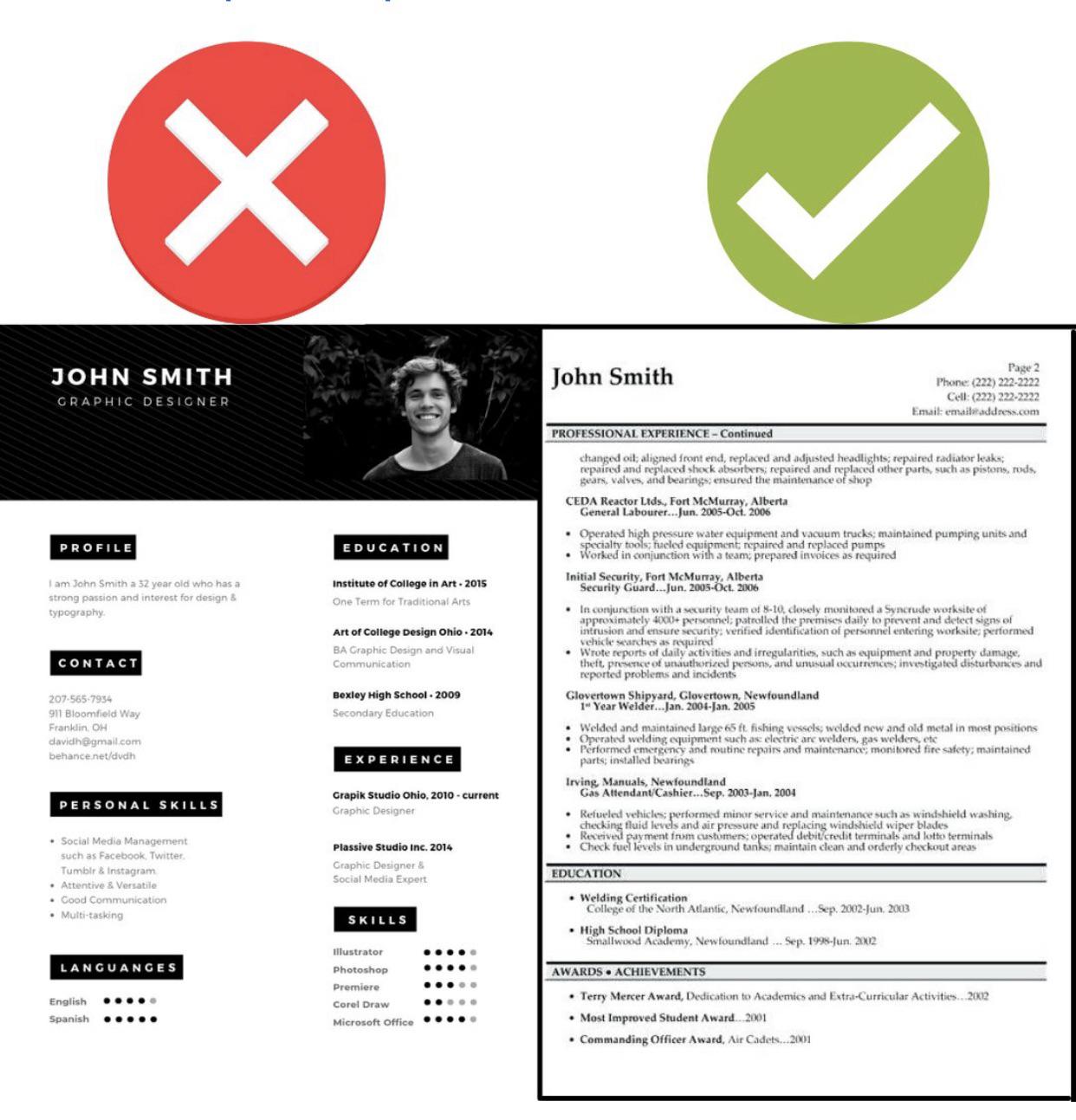
Two-column resumes often look modern and visually appealing — especially templates found online.
But for ATS systems, columns can be a problem.
What goes wrong with two-column resumes in ATS?
-
Text may be read across columns instead of down
-
Skills may be mixed into work history
-
Dates may detach from job titles
-
Entire sections can be skipped
What looks great to a human can turn into a jumbled block of text inside an ATS.
Does that mean two-column resumes never work?
Not exactly.
Some candidates report success with two-column resumes, especially when:
-
Applying to smaller companies
-
Sending resumes via direct email
-
Using modern ATS platforms
-
Applying in creative or design roles
However, success is inconsistent, and relying on layout luck is risky when applying online at scale.
The Real Reason ATS Compatibility Matters
Many ATS platforms convert resumes into plain text for recruiter review.
If your resume:
-
Uses columns
-
Tables
-
Text boxes
-
Icons
-
Graphics
…the converted version may look broken, confusing, or unreadable.
Recruiters often do not download the original file.
They judge candidates based on what the ATS shows them.
Resume File Type: PDF or Word?
Another common question is file format.
Word (.docx) vs PDF for ATS
-
Word documents are generally the safest choice for ATS compatibility
-
PDFs can work, but formatting issues are more common across different systems
Best practice:
If the application doesn’t specify, use Word format for online portals and PDF for direct email or networking.
Should You Use Colors, Fonts, or Graphics?
For most roles:
-
❌ Avoid decorative fonts
-
❌ Avoid background colors
-
❌ Avoid icons, charts, or skill bars
-
❌ Avoid star-rating systems for skills
Clean, readable typography beats creativity when software is involved.
Exception:
Design, creative, and portfolio-driven roles may benefit from a visually rich resume — but even then, keep an ATS-safe version ready.
The Best Strategy: Two Resume Versions
This is what experienced job seekers do:
1. ATS Resume (Primary)
-
Single column
-
Plain formatting
-
Clear section titles
-
Optimized keywords
-
Used for online applications
2. Visual Resume (Secondary)
-
Polished design
-
Branding and layout
-
Used for:
-
Networking
-
Referrals
-
Email submissions
-
Interviews
-
How MobileCV.ai Solves This Problem
At MobileCV.ai, we designed our CV builder around one simple idea:
Your resume should work for both machines and humans.
With MobileCV.ai, you can:
-
Generate ATS-optimized single-column resumes
-
Ensure clean text structure for parsing
-
Maintain professional, modern typography
-
Export formats suitable for online applications
-
Quickly create multiple versions for different roles
No guessing. No broken layouts. No wasted applications.
Quick Checklist: Is Your Resume ATS-Safe?
Before submitting online, ask yourself:
-
Can it be read cleanly when pasted into plain text?
-
Does it use a single column?
-
Are section headers standard? (Work Experience, Education, Skills)
-
Are keywords clearly written, not hidden?
-
Is the file simple and lightweight?
If yes — you’re ahead of most applicants.
Final Verdict: Single Column Wins for Online Applications
Two-column resumes may look impressive, but when applying online, function beats form.
If your goal is:
-
More interviews
-
Better ATS performance
-
Fewer silent rejections
👉 Use a single-column resume for online job applications.
And if you want speed, clarity, and confidence, MobileCV.ai is built exactly for that.
Ready to build an ATS-optimized resume in minutes?
👉 Try MobileCV.ai and create a resume that actually gets read.